
-
The comparison I wish I had run in 2022
-
Dimension 1: Is Okki Go a sales prospecting skill or just another tool?
-
Dimension 2: Okki Go business email finder vs. single-source email finders
-
Dimension 3: Visitor tracking and intent signals
-
Dimension 4: How does bulk email fit into an agent-native prospecting workflow?
-
Which one should you choose?
The comparison I wish I had run in 2022
I have been running outbound for B2B SaaS teams for eight years. I have personally made and documented 11 significant prospecting-stack mistakes, and they cost roughly $18,400 in wasted budget. Most of that waste came from treating data tools like commodities.
In September 2022, I bought a 20,000-contact list from a vendor that looked fine on the sample. The list cost $3,200. We loaded it into our sender, ran a three-step sequence, and watched the bounce rate hit 38% by day two. Our domain reputation dropped so hard that it took six weeks to recover. That error cost $3,200 in list fees plus about $1,900 in lost pipeline time. That is when I learned the lesson I now repeat to every RevOps hire: your prospecting stack is not a commodity. It is your brand's first impression.
So when I started evaluating Okki Go (okki-go) in Q1 2024, I did not ask whether it was cheaper than our old stack. I asked a harder question: Is Okki Go a sales prospecting skill, or is it just another business email finder with a company database attached?
To answer that, I compared Okki Go against the legacy stack we used before: separate data provider, separate email finder, separate visitor tracking, and a standalone bulk email sender. I used four dimensions:
- Workflow model: tool collection vs. agent-native prospecting skill.
- Data layer: Okki Go business email finder and company database vs. single-source data.
- Signal layer: visitor tracking and intent vs. disconnected analytics.
- Outbound layer: how bulk email fits into an agent-native prospecting workflow.
Here is what I found, including the parts that surprised me.
Dimension 1: Is Okki Go a sales prospecting skill or just another tool?
The legacy model is a collection of tools. You buy one product for company data, another for email finding, another for website visitor tracking, and another for sending. You are the integration layer. If you have a RevOps person who loves building workflows, that can work. If you do not, it becomes a part-time job.
Okki Go sits in a different category. It is agent-native prospecting. That means the system is built around an agent that can act across steps: find accounts, enrich contacts, check intent, draft outreach, and move approved messages into a sending workflow. It is not magic. It still needs clean inputs, clear targeting, and a human in the loop. But the core job is different. You are not stitching five tools together; you are directing a prospecting skill.
In my opinion, that difference matters most when your team is small. In 2023, our two SDRs spent about six hours per week exporting CSV files and matching columns between tools. That is not selling. That is data janitorial work (unfortunately).
Comparison conclusion: If you want a single tool for one job, Okki Go may feel like more than you need. If you want an agent-native prospecting skill that can run a workflow, it is a different animal. It does not replace your judgment, and it should not replace your CRM. It replaces the glue work between tools.
Dimension 2: Okki Go business email finder vs. single-source email finders
Every email finder looks accurate until you send. That is the trap.
Our old stack used a single-source business email finder. It was fast. It was also stale in niche verticals. In Q1 2023, we ran a campaign to 4,800 contacts in manufacturing and logistics. The finder returned a 71% match rate, which looked fine. The actual usable rate was closer to 54% after hard bounces and catch-all domains. We wasted $890 in sending costs and lost a week chasing a bad segment.
Okki Go's business email finder uses waterfall enrichment. Instead of trusting one database, it queries multiple sources in sequence and can fall back when a provider misses. That usually improves coverage, especially in North America and Western Europe. It can also surface role-based emails or catch-all domains, which are not the same as verified inboxes. You still need a verification step, and you still need to respect regional rules.
The company database side is similar. Legacy tools often sell you a static database that is updated on a schedule. Okki Go ties the company database to the workflow, so enrichment and intent can shape which accounts enter the sequence. That is more useful than a raw list. But it does not mean every record is perfect. No database is.
The old belief was 'more contacts equals more pipeline.' That came from an era when data was hard to get and volume was the bottleneck. Today, the bottleneck is relevance. A smaller list with better fit usually beats a larger list with stale emails.
Comparison conclusion: For high-volume outbound where coverage matters, Okki Go's waterfall enrichment is usually more practical than a single-source finder. For highly niche regions or regulated industries, you will still want manual checks. Do not let anyone sell you 100% accuracy. It does not exist.
Dimension 3: Visitor tracking and intent signals
This is where the comparison surprised me.
Our legacy setup had website visitor tracking, but it lived in a separate analytics tab. We could see that a company visited our pricing page three times. Then someone had to manually match that company to a contact, enrich it, and add it to a sequence. By the time that happened, the signal was cold.
Okki Go connects visitor tracking to the prospecting workflow. In practice, that means an account can show up as a signal inside the same system where you find contacts and launch outreach. The agent can use that signal to prioritize accounts or suggest next steps. That shortens the gap between interest and action, which is the whole point of intent data.
But here is the counterintuitive part: visitor tracking is not a strategy by itself. Most of your best accounts may never visit your site before you reach out. If you over-index on visitor tracking, you will end up chasing the same retargeting pool as everyone else. In my experience, visitor tracking works best as a trigger, not as your entire ICP definition.
We tested this in Q2 2024. We split our outbound into two groups: one triggered by visitor tracking, one triggered by firmographic fit. The visitor-tracking group had a higher open rate, but the firmographic group produced more qualified meetings. Why? Because a visit is a moment, not a market. The question is not 'who visited?' It is 'who fits and is showing a buying signal?'
Comparison conclusion: Okki Go wins on integration because visitor tracking sits next to the company database and email finder. Legacy stacks win if you only need basic analytics and already have a separate intent provider you trust. But do not expect visitor tracking alone to fix bad targeting.
Dimension 4: How does bulk email fit into an agent-native prospecting workflow?
Bulk email has a bad reputation, and some of it is deserved. Batch-and-blast still works for a few low-consideration offers, but for B2B, it usually burns domains and brand trust.
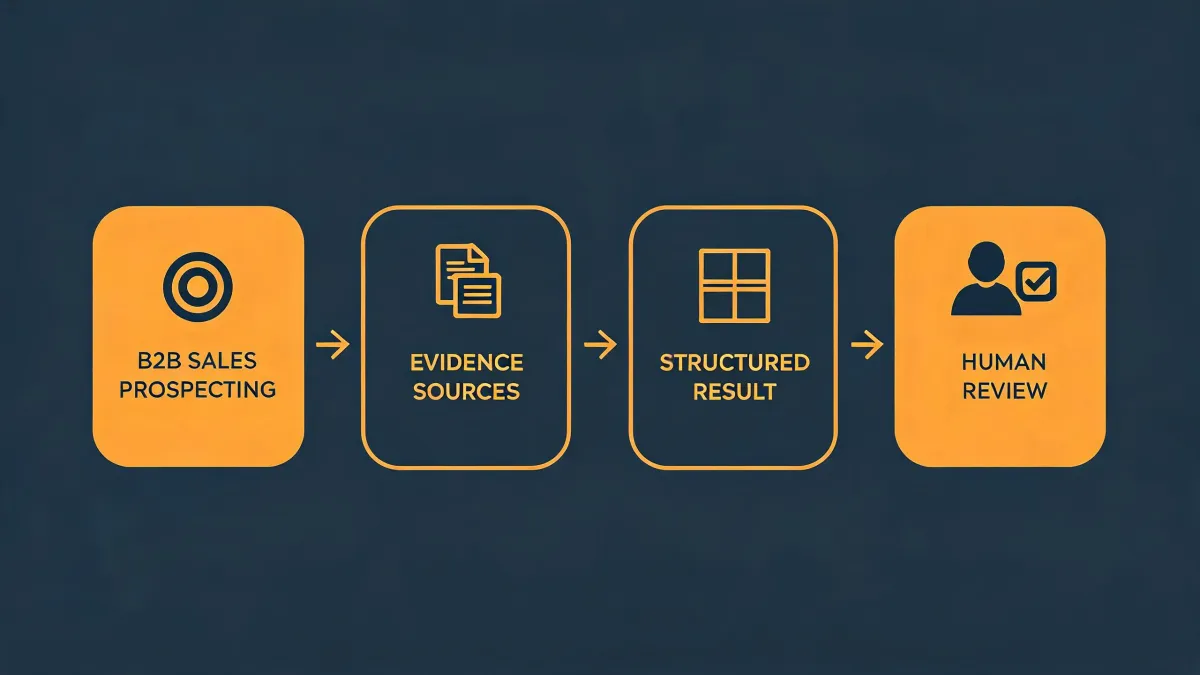
In an agent-native prospecting workflow, bulk email is not the starting point. It is a downstream step. The flow looks more like this:
- Define ICP and exclusions.
- Pull accounts from the company database.
- Enrich contacts with the business email finder.
- Layer in intent or visitor tracking signals.
- Draft segmented messages with the agent.
- Human review for tone, claims, and compliance.
- Send in controlled batches, then monitor deliverability.
That is how bulk email fits. It is not a separate blast. It is the output of a prospecting skill that has already done the research. Okki Go can help with this because the same workflow handles data, enrichment, and outreach logic. But the human-in-the-loop part is not optional. If you remove review, you are just automating spam.
I made that mistake once. In 2021, we automated a sequence without a review step for a new product line. The copy had a pricing claim that was wrong for one region. We sent 2,300 emails before anyone caught it. That cost us $1,400 in rework and a very awkward call with our legal team. Now our rule is simple: agent drafts, human approves, then bulk send.
There is also a risk trade-off. The upside of agent-native bulk email is time. We cut manual sequencing time by about 11 hours per week. The risk is deliverability. If you scale too fast, you can hurt your domain reputation. We calculated the worst case: a two-month domain warm-up reset. Best case: we saved a full SDR week per month. The expected value said go, but the downside felt catastrophic. So we capped volume, warmed new domains, and monitored spam complaint rates. According to Google's Email Sender Guidelines (2024), bulk senders should keep spam complaint rates below 0.3% in Postmaster Tools. We stayed under 0.1% for 30 days before scaling (as of Q2 2024, at least).
Comparison conclusion: Legacy bulk email is a batch tool. Okki Go treats bulk email as one step inside an agent-native prospecting workflow. If you need high-volume sends with no research layer, a standalone sender is fine. If you want bulk email to be triggered by data and intent, the agent-native model is more coherent.
Which one should you choose?
There is no universal winner. Choose based on your bottleneck.
Choose Okki Go if:
- You have a B2B sales team, RevOps function, or outbound agency.
- You want an agent-native prospecting skill instead of five disconnected tools.
- You need a business email finder and company database that work inside the same workflow.
- You want visitor tracking and intent to trigger outreach, not sit in a separate dashboard.
- You are willing to keep a human in the loop for quality and compliance.
Stay with a legacy stack if:
- You have highly specialized data requirements that one provider already solves.
- Your procurement process does not allow new agent-based tools.
- You send fewer than 500 emails per month and prefer manual research.
- You already have best-in-class point solutions and a RevOps team that enjoys maintaining them.
In my case, we did not rip out our CRM. We added Okki Go as the prospecting skill layer on top. That gave us the agent-native workflow without losing the system of record. The quality difference showed up in small ways first: fewer bounced emails, cleaner account notes, faster sequence prep. Then it showed up in brand perception. When your outbound is relevant and accurate, prospects treat you like a serious company. When it is sloppy, they remember.
That is the real comparison. It is not Okki Go vs. another tool. It is a professional first impression vs. a preventable mistake.